Laser Engraver Fumes at Home: Enclosure, Exhaust or Air Purifier?
How to vent a laser engraver at home or in an apartment. When an enclosure is enough, when you need a window exhaust or purifier, and which materials you must never laser.
DisclosureWe may earn a commission when you buy through links on this site, at no extra cost to you. As an Amazon Associate we earn from qualifying purchases.
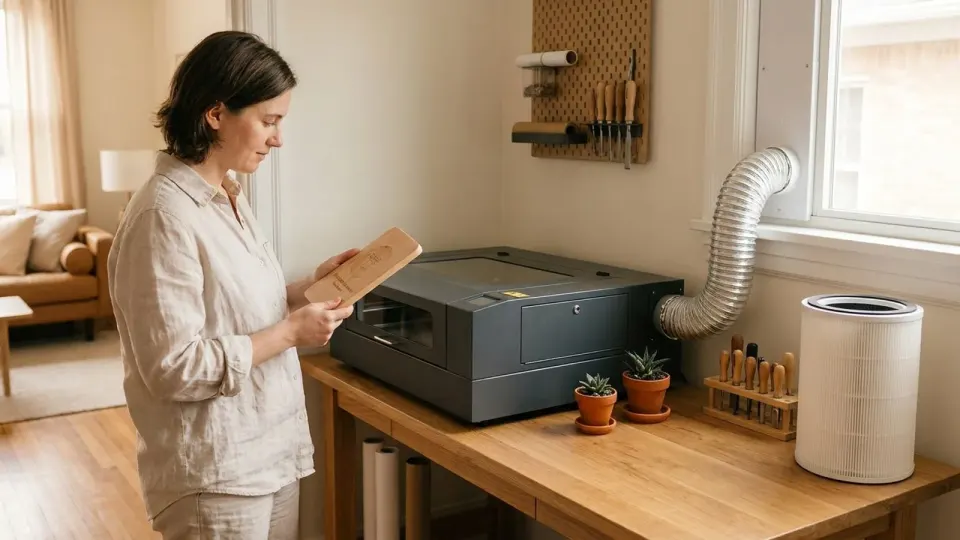
Every laser engraver makes smoke, so every one needs ventilation, enclosed or not. The best setup is to duct the exhaust outdoors through a window or wall vent, using an inline fan if the hose run is long. If you can’t vent outside, use a laser-specific air purifier with carbon and HEPA filters and replace the filters on schedule. An enclosure contains the smoke and the beam, but it doesn’t remove anything by itself. It has to be connected to one of the two. And some materials, like PVC and vinyl, should never go in a laser at all.
Shopping for a machine first? See the best enclosed laser engravers for home use.
Why laser fumes matter
When a laser burns or vaporizes material, it releases smoke, gases and fine particles. OSHA’s laser hazards pages call these laser-generated air contaminants (LGAC) and recommend controlling them at the source with local exhaust ventilation. What’s in the smoke depends on the material, which is why “what you cut” matters as much as “how you vent”.
The makers say the same thing in their own manuals. xTool’s S1 user guide tells you to “put its end outside the window or connect its end to a smoke purifier.” Its S1 safety SOP adds that exhaust must be “properly treated or discharged outdoors where it can safely dissipate.” Monport fits its 40W CO2 laser with a built-in fan and an exhaust port meant for venting outdoors.
Your three options
| Setup | What it does | Good for | Watch out for |
|---|---|---|---|
| Exhaust to outdoors (hose + window or wall vent, optional inline fan) | Removes smoke from the room | Garages, spare rooms, apartments with a usable window | Seal the window gap, keep the hose short and straight, don’t vent near a neighbor’s window or air intake |
| Laser air purifier (carbon + HEPA) | Filters smoke and returns air to the room | Rooms with no window to vent through | Filters fill up and must be replaced; check the maker lists it for your machine |
| Enclosure (built-in or add-on) | Contains beam, smoke and debris | Every home setup, especially with kids or pets | Doesn’t clean the air on its own; must connect to exhaust or a purifier |
In practice, the best home setup is enclosure + exhaust to outdoors. Enclosure + purifier is the fallback when you can’t reach a window.
Option 1: exhaust to outdoors
This is the setup xTool’s S1 guide and Monport’s 40W Pro page describe, and it works for any machine in our enclosed laser roundup that has an exhaust port.
- Connect the hose to the laser’s exhaust port. Monport’s 40W Pro port is about 4 inches. For other machines, check the manual or measure the port before you buy hose and adapters; not every maker lists the size on its product page.
- Keep it short. Every bend and extra foot of hose slows the air. If the run is long, add an inline duct fan.
- Seal the window. Use a window vent panel or a board with a duct flange so smoke doesn’t blow back in.
- Make up air. The air you push out has to come back in. Leave a door ajar or a second window cracked.
An inline fan like the AC Infinity CLOUDLINE S4 is a common add-on. AC Infinity rates it at 226 CFM and 26 dBA with a 10-speed controller. It’s sold for grow tents, not lasers, so match the 4-inch duct size to your laser’s port and put the fan between the laser and the window so it pulls air through the hose.
AC Infinity CLOUDLINE S4 Inline Duct Fan (4-inch)
A 4-inch inline duct fan with a 10-speed controller. Sold for grow tents, but commonly used to pull fumes from a laser or resin enclosure out through a window vent.
- Duct size
- 4 in
- Airflow
- 226 CFM
- Noise
- 26 dBA
Option 2: a laser air purifier
If there’s no window you can reach, a purifier built for laser smoke is the next best thing. Look for:
- Carbon for gases and HEPA for particles. xTool lists the SafetyPro AP2’s layers as cyclone, pre-filter, medium-efficiency filter, activated carbon, carbon mesh and HEPA.
- Airflow that matches your machine. xTool rates the AP2 at 150 m³/h and lists the S1 as compatible. Its bigger AP2 Max is rated at 700 m³/h.
- Filter life and cost. xTool puts filter life at about 100 to 600 hours depending on the layer. When carbon is saturated, it stops absorbing gases. Replace filters on schedule, not when you notice a smell.
xTool SafetyPro AP2 Laser Air Purifier
A laser fume purifier with a cyclone stage, pre-filter, carbon and HEPA layers. xTool lists it as compatible with the S1. For when you can't duct the exhaust out of a window.
- Airflow
- 150 m³/h
- Power
- 120 W; AC 100–120 V, 60 Hz (US version)
- Noise
- About 55 dB (low) to 65 dB (high), per xTool's FAQ
Option 3: enclosures
An enclosure has two jobs: containing the beam (eye safety) and containing the smoke so it can be pulled out through one port.
- Built-in Class 1 enclosures, like the xTool S1, WeCreat Vision and Creality Falcon2 Pro, keep the beam inside during normal use, per their makers. You still connect the exhaust.
- Add-on enclosures for open-frame diodes are fire-retardant tents or boxes with an exhaust port. They help contain smoke and reflections, but they don’t make an open-frame laser Class 1. Keep wearing wavelength-rated glasses unless the maker says otherwise.
If you haven’t bought a laser yet, buying an enclosed Class 1 machine is usually simpler than adding a tent later. See diode vs CO2 for which technology you need.
Materials you should never laser
These come from xTool’s plastics safety guide and support pages. They apply to diode and CO2 lasers alike.
| Never laser | Why (per xTool) |
|---|---|
| PVC (including many vinyls and some faux leathers) | Releases hydrochloric acid, vinyl chloride, ethylene dichloride and dioxin; corrosive to people and the machine |
| ABS | Releases hydrogen cyanide |
| Polycarbonate | Listed among plastics that emit toxic fumes; also melts and drips |
| Polystyrene foam | Produces styrene |
| Anything you can’t identify | You can’t know what it will release |
Also check a material’s SDS before you laser it. Not every “vinyl” is PVC (xTool notes some printable adhesive vinyls aren’t), but if the label or SDS doesn’t say, leave it out.
Laser fumes in an apartment: a checklist
- An enclosed Class 1 machine, or an open-frame laser inside a fire-retardant enclosure
- A window exhaust with a sealed vent panel, or a laser purifier listed for your machine
- Safe materials only: wood, leather you know is suitable, cardboard, paper, cast acrylic (CO2 for clear)
- Smoke detector working, fire extinguisher within reach, and never leave a job running unattended
- Check your lease and be considerate: don’t vent toward a neighbor’s window or a shared hallway
The same logic, vent outdoors first and filter if you can’t, applies to resin 3D printers. See can you resin print in an apartment?. More gear for a safe maker space is in our tools and upgrades section.
FAQ
Do I need an air purifier for laser engraving? You need either an exhaust to outdoors or a laser-rated purifier. If you can vent through a window, that’s what the makers describe first. A purifier is for rooms where you can’t.
Is an enclosed laser engraver safe without ventilation? No. The enclosure contains the beam and the smoke, but it doesn’t remove the smoke. xTool’s S1 user guide, for example, tells you to run the exhaust pipe out of a window or into a smoke purifier. Check your own machine’s manual for its exhaust setup.
What materials should you never laser? PVC and most vinyls, ABS, polycarbonate and polystyrene foam, plus anything you can’t identify. xTool lists hydrochloric acid, vinyl chloride and dioxin among PVC’s byproducts, and hydrogen cyanide for ABS.
Can I vent a laser engraver into the room through a window fan? Not by itself. A box fan in the window doesn’t capture the smoke at the source. Duct the laser’s exhaust port directly to the window instead.
Do laser fumes smell when the purifier is working? A smell suggests the carbon filter may be saturated or the hose isn’t sealed. Check the seals and follow the maker’s filter replacement schedule. Don’t use smell alone as a safety test.
Sources
- OSHA: Laser Hazards, standards and solutions pages (osha.gov/laser-hazards)
- NIOSH: Approaches to Safe 3D Printing: A Guide for Makerspace Users, Schools, Libraries, and Small Businesses (publication 2024-103), and NIOSH 3D-printing safety pages (cdc.gov/niosh)
- xTool Support: S1 User Guide (support.xtool.com/article/1106) and S1 LSO Training / SOP (support.xtool.com/article/1261)
- xTool Support: Safety Guide, What Plastics Can Be Cut or Engraved? (support.xtool.com/article/870)
- xTool: SafetyPro AP2 product page, user guide and FAQ (xtool.com, support.xtool.com)
- Monport: 40W Pro product page (monportlaser.com)
- AC Infinity: CLOUDLINE S4 product page (acinfinity.com)